Choosing a Model
Rolltop connects to every major LLM provider through one app and one credit balance — no juggling separate subscriptions. You choose a model per conversation, and Rolltop keeps the catalog up to date from its servers, so new models appear without an app update.
Providers
Cloud (use credits)
- Anthropic Claude — the Opus, Sonnet, and Haiku tiers. Strong all-rounders for writing, reasoning, and tool use.
- OpenAI GPT — the current GPT-5 series, from flagship reasoning down to fast variants.
- Google Gemini — the Pro and Flash tiers, including million-token context models.
- xAI Grok — with built-in X Search that can pull cited results from X (Twitter).
Every provider offers roughly the same shape of choice: a frontier model for hard work, a mid model for everyday use, and a cheap fast model for bulk or tool-driven tasks. Pick by the job, not by the vendor.
Local (free, private)
- Ollama — run any model on your own machine. No credits, no internet required, and your data never leaves your computer. See Local Models (Ollama).
How to pick a model
Choose a model from the selector at the top of a conversation. Rolltop sorts models by recency and highlights the latest releases.
By default the picker shows a curated set of current models — the ones worth reaching for today. Turn on show all models (in Settings → LLM Models) to see the full catalog including older releases. The catalog itself is loaded from Rolltop's servers, so new models appear without an app update, and a superseded model dropping out of the default list never breaks a conversation that still uses it.
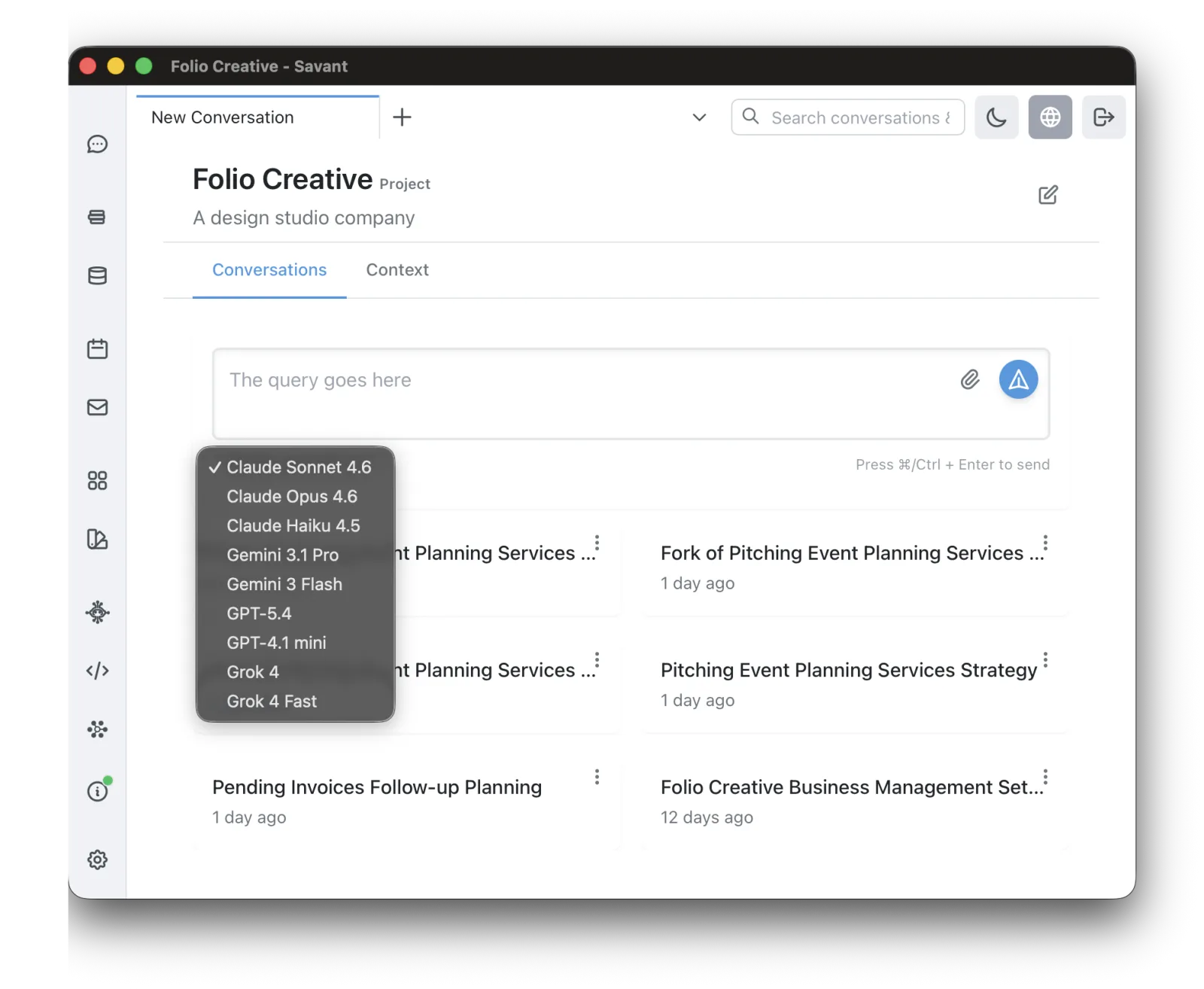
There are three levels of preference, from broad to specific:
- Global preferred model — your default everywhere (set in Settings → LLM Models).
- Per-project default — overrides the global default inside a project (also set in Settings → LLM Models, as the Default Model for the active project).
- Per-conversation override — pick a different model for one conversation.
Which model should I use?
There's no single right answer, but some rules of thumb:
- Everyday chat, writing, analysis — a capable general model like Claude Sonnet or GPT.
- Hardest reasoning / highest quality — a top-tier model like Claude Opus.
- Fast, cheap, high-volume — a "fast" or "mini/flash" variant.
- Current events / X discussion — Grok, with its built-in X Search.
- Private or offline work, zero cost — a local Ollama model.
When in doubt, start with a strong general model and switch if you need more speed or more depth.
Context window
Each conversation can use up to 80% of the model's actual context window — for example around 160K tokens for Sonnet, and up to ~800K for 1M-context models. Longer conversations and large attachments stay within that budget automatically.
Cost
Cloud models consume credits; local models are free. See Credits & Pricing for how usage is charged and where to watch your balance.